


AI & creative assets
Draft creative with AI or reuse existing assets. Keep it mapped to the plan.


MEDIACENDO: THE PAID MEDIA OPERATING SYSTEM
Turn your brief into research and a media plan with AI. Bring media and creative together, then build, optimize and report, with naming, POs and approvals built in.


| Your workflow | THE OLD WAYBefore | WITH |
|---|---|---|
| Media planning | Spreadsheets and manual calculations. | Budgets and fees in one editable plan. |
| Creative approvals | Email threads and unclear sign-off. | Visual review with recorded approval. |
| Campaign naming | Names typed manually in Ads Manager. | Saved naming rules applied at build. |
| Products & audiences | The same details retyped in each brief. | Saved details reused across campaigns. |
| Spend checks | Forecasts and spend in separate files. | Planned versus actual results in one view. |
Research, plan, approve and build in one connected workflow. Keep the agreed setup with the campaign, then optimize and report against it.
Powered by leading AI models from OpenAI, Anthropic and Google, with every output reviewed by your team.
Capture goals, audiences and campaign requirements.
Get AI-powered insights into audiences, markets and competitors.
Generate and edit channel-specific plans.
Map creatives to channels, audiences and formats.
Build with approvals, naming conventions and POs.
Turn insights into stronger results.
Track performance against your plan.
RESEARCH & MEDIA PLANNING
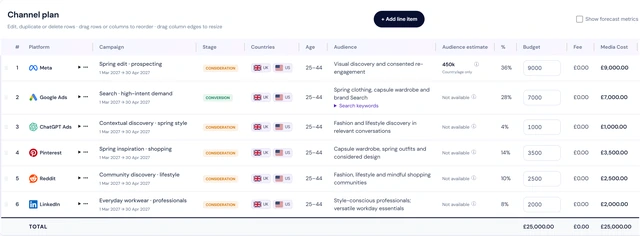
Create AI-assisted research and an editable media plan from your brief. Bring budgets, targeting and creative together in a visual activation plan, ready for your team to review.
THE DETAILS THAT KEEP WORK MOVING
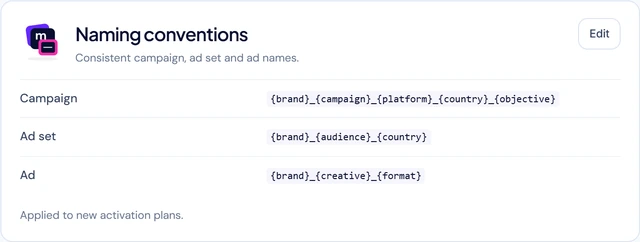
Stop rebuilding campaign setup. Reuse product and audience details, apply your naming rules and track POs. AI helps prepare the work; your team controls approvals and launch.
For agencies, in-house teams and brands working with agencies.
Draft creative with AI or reuse existing assets. Keep it mapped to the plan.
Keep feedback with the plan and assets, instead of scattered email threads.
Record who agreed what, and which version, before build.
Apply saved naming rules automatically when you build.
Attach POs to plans and track spend against each one.
Reuse saved product details and audiences across briefs and campaigns.
OPTIMIZATION & REPORTING
Compare planned budgets with actual spend and results. See delivery differences, audit campaign activity and keep every change connected to the agreed plan.
Review campaigns, ad sets and ads across connected accounts. Manage delivery and submit pauses or budget changes through the approval process on supported platforms.
Book a demo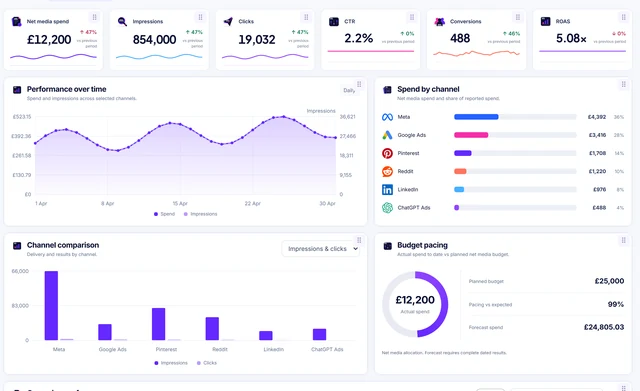
 onepaidmedia
“Before Mediacendo, building a media plan and activation plan took us over 6 hours. Now it takes only a few minutes. Research, formatting media plan, calculating fee and budget tasks are gone, and every approval is recorded.”
Alex Turner · Senior Media Manager, One Paid Media
Control who can access your workspace. Keep credentials protected and decisions recorded.
Workspace and brand permissions restrict who can view, edit and approve campaign work.
HTTPS protects traffic. Stored Meta and Google tokens are encrypted, and passwords are stored as hashes.
Our privacy policy explains UK/EU GDPR and US state privacy rights where applicable, data use and how to make a request.
For procurement: review the policy for hosting locations and international transfers, and ask us to confirm the data-processing terms for your workspace.